
# Google Ads Leads: How Local Service Businesses Get Qualified Ones

Google Ads produces leads for a local service business when three things work together: a campaign built around a lead goal (calls, forms or messages), tracking that records which leads became booked jobs, and fast follow-up on every inquiry. Miss any one and you pay for clicks that never turn into revenue. At Roxfire we build and manage Google Ads for HVAC, roofing, cleaning, moving, dental and garage door companies, and we track campaigns to revenue rather than to clicks. This guide shows how the leads are generated, how to set the campaign up, and how to keep the leads worth answering.
- Google Ads can deliver phone calls, form submissions and messages. Choose the "Leads" campaign goal and give Google a real conversion action to optimize toward.
- Tell Google what a good lead is. Optimizing toward booked appointments or qualified leads beats optimizing toward raw form fills.
- Send every lead into a CRM and report back to Google Ads which leads became jobs. Without that, you are measuring cost per inquiry, not cost per customer.
- Cost per lead depends on your trade, local competition and your location. Google's own guidance says so, so judge your numbers against your market, not a national average.
- Our Google Ads management starts from $1,200 per month, with no long-term contract.
What counts as a "lead" in Google Ads
A lead is any action where a potential customer tells you they want to talk: a call, a submitted form, a text or email message, or a booking request. Google Ads records these as conversions. The distinction that matters for your business is between a lead and a *qualified* lead. A call from someone two states away or a form from a competitor checking your prices is a lead in Google's count and worthless to your schedule.
Google's guide to lead generation for local businesses describes the basic approach: target ads by location, define the behaviors you want as conversion actions, and review reports on cost per conversion and conversion rate. Everything that follows builds on those three ideas.
The three ways Google Ads leads arrive
Phone calls
For most home service trades, the phone is where the money is. A burst pipe, a dead AC in July or a roof leak does not get a form submission at 9 p.m. It gets a call. Calls can come from call assets attached to your search ads or from the number on your landing page. Google's 2026 changes affect how call ads work, so it is worth reading our 2026 Google Ads update guide for home service businesses before you plan a call-heavy setup.
Lead forms
Lead form assets let people submit their information inside the ad without visiting your website. Google's lead form best practices say forms can be added to Search and Performance Max campaigns that use responsive search ads, need a bidding strategy focused on conversions for the lead form goal, and must include a link to your privacy policy at the end of the form.
The same page recommends a short, attention-grabbing headline (30 characters), a clear call to action and well-chosen questions. Two features matter for quality: Conditional Answers tailor the options a person sees, and Qualifying Responses help filter out low-intent prospects. A dental office, for example, can ask whether the person is a new patient and what they need, so the front desk spends time on people it can book.
Messages
Message leads let a prospect text or email you directly from the ad. Google's pay-per-lead goal documentation says messages are enabled by default and share the customer's name, ZIP code and job details, which gives your team context before the first reply. The same page notes that in the US and Canada, inbound calls through the Google forwarding number are recorded, with a pre-recorded notice to the customer. Tell your staff that, because it also means you can review how calls were handled.
How to set up a Google Ads campaign for leads
The mechanics are not the hard part. Doing them in the right order, and with the right goal, is.
1. Create a campaign with the Leads objective. Google's Search campaign guide says to choose Leads as the objective and Search as the campaign type, enter at least one conversion goal, and focus bidding on conversions. 2. Define the conversion before you spend. Google's setup walkthrough says to set up conversion tracking before going live when you optimize for online conversions. A campaign without it gives Google nothing to learn from. 3. Build tight ad groups. The Search guide calls for relevant keyword-based ad groups with at least three ads each. Group by service: "AC repair" and "AC installation" are different customers with different job values, and they should not share an ad group. 4. Set location targeting to the area you actually serve. Drive-time reality matters more than a county line. A roofer who will not travel 40 miles should not pay for clicks from there. 5. Choose a daily budget you can sustain. Google's learning systems need enough conversions to work with. Spreading a small budget across many services starves all of them. 6. Send clicks to a page built for one action. A dedicated landing page that matches the ad and makes calling or booking the obvious next step usually does more than a home page. Our landing page design and website optimization work covers this.
In our work, steps 2 and 6 are where most accounts go wrong. We set up conversion tracking and build the landing pages as part of the engagement, so the campaign launches with a way to measure revenue and a page designed to convert.
Track leads all the way to the CRM
A cost-per-lead number tells you what an inquiry cost. It does not tell you what a *customer* cost. For that you need to know which leads became booked jobs, and you need Google to know too.
Google's lead form guidance recommends sending lead form data straight to your CRM using a webhook or Zapier integration so your team can follow up quickly, or exporting up to 60 days of data through the Google Ads API. It also recommends Enhanced Conversions for Leads for more durable, accurate reporting, including across devices (Google Ads Help).
For jobs that close later, Google's lead generation playbook explains offline conversion imports. You upload the GCLID (the click ID Google attaches to each ad click), the conversion name, the conversion time and a conversion value. Smart Bidding with a value-based goal can then look for the kinds of customers who actually paid.
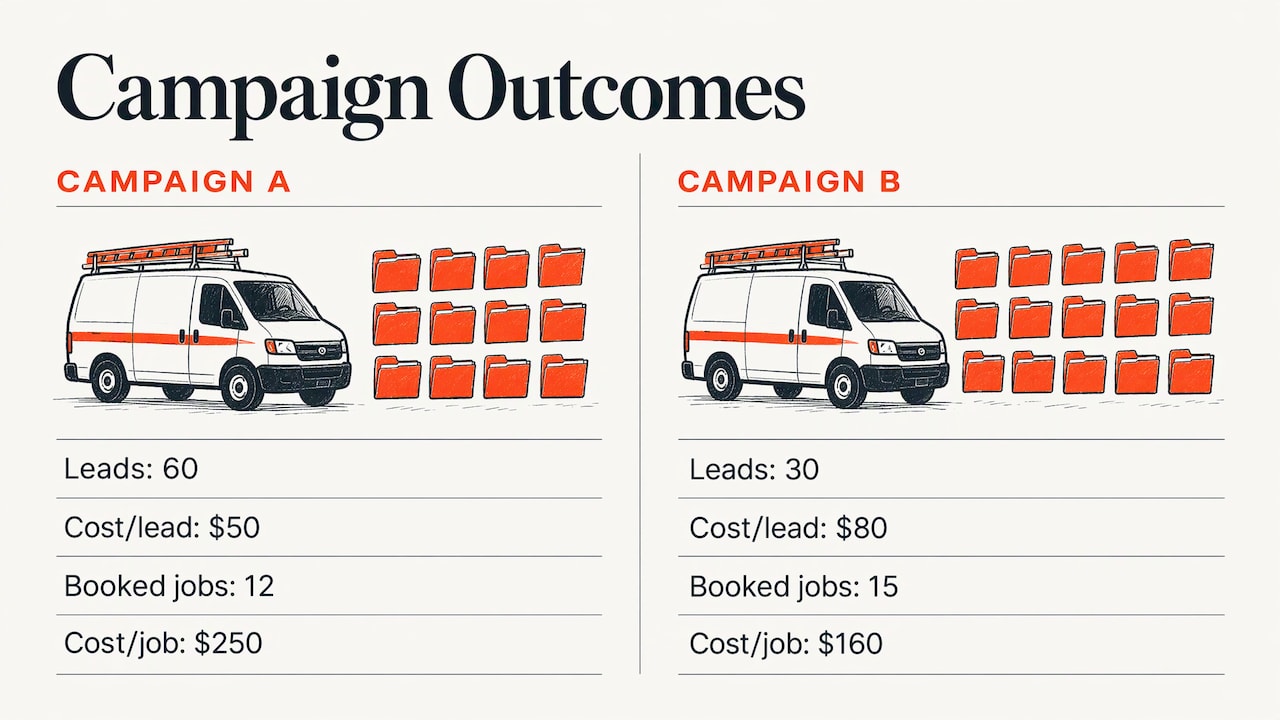
A simple worked example shows why this matters. Say you spend $3,000 in a month and get 60 leads, a $50 cost per lead. That looks healthy. But if only 12 become booked jobs, your cost per job is $250. If a second campaign produced 30 leads at $80 each and 15 booked jobs, its cost per job is $160. The "more expensive" campaign is the better one, and you only see it when outcomes flow back from the CRM. (The numbers are an illustration, not a benchmark.)
This is the part of the work we take off owners' hands: conversion tracking, Go High Level CRM setup and automation, and reporting that ties campaigns to revenue. For moving companies that need CRM integration and dental offices that need a full calendar, it is usually the difference between a campaign that feels busy and one that fills the schedule.
Keep lead quality high
Volume is easy to buy. Quality takes deliberate settings. Google's best practices for generating high-quality leads point to several:
- Pick lead-specific conversion goals. Goals such as qualified lead, converted lead, book appointment or request quote trigger built-in invalid traffic protections.
- Verify submissions. Options include reCAPTCHA, double opt-in or server-side validation, which cut fake and bot-driven forms.
- Use exclusions. Content and brand exclusions keep your ads away from placements that waste budget.
- Align targets with business goals. Set cost-per-action or return-on-ad-spend targets that reflect what a customer is worth to you.
- Map the lead journey. Google recommends Lead Journey Mapping, which links conversion actions and business metrics to funnel stages, so automated bidding optimizes for high-value outcomes rather than lead count.
On your side, speed matters as much as settings. A prospect who filled out a form usually contacts more than one company. Answer calls live where you can, return missed calls fast and respond to messages the same hour. Our AI voice and automation service, listed on our marketing services page, is built to help with the intake side, and email nurture campaigns keep leads who are not ready to book yet in your pipeline.
Negative keywords are the other quality lever. A cleaning company that does not offer carpet dyeing, or an HVAC contractor that does not sell parts, should block those searches. Review your search terms report weekly at first, then monthly once the account settles.
What a Google Ads lead costs
There is no single honest answer, and any flat figure should make you suspicious. Google's local lead generation guide says rough cost-per-lead estimates depend on the type of service or industry, the level of local competition and the specific location, including population density and economic factors. An emergency plumbing lead in a dense metro costs more than a routine cleaning inquiry in a small town.
Use Google's budget calculator for a starting estimate. Then use your own account data, because what matters is cost per *booked job* relative to what that job earns. If you want trade-specific ranges, we publish them in our Google Ads cost per lead guide for home services and, for heating and cooling, in the HVAC lead generation cost breakdown.
Two factors that you control move your cost more than most owners expect: the conversion goal you optimize toward and the landing page the click arrives on. A better page turns the same click spend into more leads, which lowers cost per lead without touching bids.
Google Ads and Local Services Ads: two lead engines
Google runs two products that generate leads for local businesses. They work differently, and many service companies use both.
| Google Ads (Search) | Local Services Ads | |
|---|---|---|
| What you pay for | Clicks, with bidding focused on conversions | Valid leads |
| Control | Keywords, ad copy, landing pages, budgets | Budget, bid per lead, profile, reviews |
| What shows | Your ads and pages you design | Business profile with Google badge |
| Best at | Targeting specific services, areas and offers | Capturing ready-to-call local demand |
Local Services Ads rank businesses on factors Google lists in its guide to growing with Local Services Ads: proximity to the customer, review score and volume, responsiveness to leads, Google Business Profile quality, bid mode and budget. You set an average weekly budget and a maximum bid per lead, and Google's Local Services help says invalid or low-quality leads are not charged and that charged leads may be credited if later judged low quality.
The same help page lists what counts as a billable lead: answered calls, missed calls where the customer stays on the line more than 20 seconds, text or email messages, voicemails and, in the US and Canada, booking requests. Message leads are typically priced lower than phone leads.
Both channels feed the same pipeline, and Google Ads gives you the most control over which services, neighborhoods and offers you promote, with pages and tracking you own. Because reviews and Google Business Profile quality also affect Local Services Ads, strong local SEO and Business Profile work supports the whole system. If you are weighing Google against social channels, our comparison of Google Ads vs. Meta Ads explains where each fits: search catches people already looking for a fix, while Meta builds demand earlier.
Trade-by-trade: what a good lead looks like
HVAC. Emergency repair and seasonal replacement behave like two different businesses. Separate campaigns let you bid harder on no-cool and no-heat calls and keep replacement leads, which are worth more per job, on their own budget. See our Google Ads for HVAC guide.
Roofing. Jobs are large and infrequent, so one booked inspection can justify a high cost per lead. Optimize for booked inspections, not form fills.
Cleaning. Margins per job are smaller, so cost per lead has to stay low. Recurring-service customers are worth far more than one-off cleanings, so track which leads become repeat clients.
Moving. Leads age fast because people pick a mover quickly. CRM integration and immediate response are the priorities.
Dental. The goal is a full calendar of the right procedures. Qualifying questions on the form and booking-focused conversion goals help you fill chairs with new patients rather than price shoppers.
Garage door repair. Urgent, call-driven demand. Mobile call experience and fast answering decide who wins. We cover this in our garage door repair marketing guide.
Where Roxfire fits
Running Google Ads for leads is a job with weekly decisions: search terms, bids, budgets, landing page tests and CRM reconciliation. We specialize in local service businesses and track every campaign to revenue. Our Google Ads Management starts from $1,200 per month, and our Meta Ads Management starts from $940 per month. If you want search, local SEO and a CRM-connected funnel under one roof, the Local Growth, Revenue Engine and Market Domination plans run from $1,000 to $1,500, $2,000 to $3,000 and $4,000 to $6,000 per month. HVAC companies can also look at the HVAC marketing packages, where the Growth Package is $2,500 per month. There are no long-term contracts.
A 30-day plan to start
1. Week 1: List your three most profitable services and the ZIP codes you want. Decide what a qualified lead means for you, such as a booked estimate or a booked appointment. 2. Week 2: Install conversion tracking for calls, forms and messages, and connect your CRM so every lead has a source. 3. Week 3: Launch one campaign per service with a matching landing page. Add negative keywords from day one. 4. Week 4: Review the search terms report, remove wasted queries and compare cost per booked job across campaigns. Start importing closed jobs back into Google Ads.
After that, the work is steady refinement, which is exactly where consistent management earns its fee.
FAQ
How do I get leads from Google Ads?
Create a Search campaign with the Leads objective, add a conversion goal such as calls or form submissions, and build ad groups around specific services. Track every lead into your CRM and send the results back to Google Ads. That way bidding aims at booked jobs, not just inquiries.
How much does a Google lead cost?
It depends on your industry, the level of local competition and your location, according to Google's local lead generation guide. Two businesses in different trades or cities can see very different costs. Compare cost per booked job, not only cost per lead.
Is a Google Ads lead form better than sending people to my website?
Forms are faster for the customer and work well for quote requests. A landing page gives you more room to build trust and show reviews and pricing context. Many accounts use both, and the right mix depends on how your customers prefer to contact you. Phone-driven trades usually keep a prominent call option on either.
How do I stop fake or low-quality leads?
Choose lead-specific conversion goals, which trigger Google's invalid traffic protections, and verify submissions with reCAPTCHA, double opt-in or server-side validation. Add qualifying questions to lead forms and use negative keywords to block irrelevant searches.
Can Google Ads and Local Services Ads run together?
Yes. Local Services Ads charge per valid lead, while Google Ads gives you control over keywords, offers and landing pages. Many local service businesses run both and measure each by cost per booked job.
Sources
- Guide to lead generation for local businesses, Google Ads
- Create a Search campaign, Google Ads Help
- How to set up your first Google Ads campaign
- About goals and leads for pay-per-lead goals, Google Ads Help
- Best practices for lead form assets, Google Ads Help
- Best practices for generating high-quality leads, Google Ads Help
- How to generate high-quality leads with digital ads, Think with Google
- How to grow your business with Local Services Ads
- How leads work, Local Services Help
Want this handled for you?
We run Google Ads, Meta Ads, and SEO for local service businesses. Book a call and we will show you what your numbers could look like.