# AI Appointment Booking for Local Service Businesses
AI appointment booking is software that answers a call, text or web inquiry, checks your real calendar, books an open slot and confirms it, without anyone on your team picking up the phone. For a local service business, the value is simple: a lead who reaches you at 8 p.m. or while your crew is on a roof gets an answer and a booked time, instead of a voicemail they never get back to. At Roxfire Marketing Agency, we build AI voice assistants and automation for HVAC, roofing, cleaning, moving, restoration, garage door, pool, window and dental businesses, because ad spend and SEO only pay off when the lead that arrives actually gets booked.
- An AI booking assistant is only as good as the calendar, the qualifying questions and the CRM behind it. Set those up first, then switch it on.
- It earns its keep on missed calls, after-hours inquiries and slow replies, which is where paid leads quietly leak away.
- Measure it with your own numbers: calls answered, appointments booked, jobs sold and cost per booked job.
- Calling and texting rules apply. Collect consent at booking and review the rules with an attorney before automating outbound calls or texts.
- Roxfire does not guarantee leads. We connect booking to tracking so you can see what each lead is worth.
What AI appointment booking actually does
Think of it as a receptionist that never goes to lunch. A good setup does five things in one conversation:
1. Answers right away. Phone, website chat or text, any hour, including weekends and holidays. 2. Understands plain speech. The caller says "my furnace is making a grinding noise, can someone come tomorrow?" and the system works out the service type and urgency. 3. Qualifies the lead. It asks for address or ZIP code, the problem, and how soon the work is needed. 4. Books against your live calendar. It offers only times you have open, in your time zone, and writes the appointment in. 5. Updates your records. The name, phone number, address and notes land in your CRM (customer relationship management software, the system where you track every lead and job).
That last step is what separates AI booking from a plain online scheduling link. A link only lets people pick a slot. An AI assistant also holds the conversation, screens out jobs you do not want, and hands the details to your team.
The channels that matter
Most local service leads come in by phone, but not all. Your assistant should cover the call, the website form or chat, and text messages. All of them need to draw on one shared calendar. If the phone assistant and the website widget each keep their own schedule, you will get double-bookings within days.
Where service businesses lose bookings today
Before buying anything, find the leak. Pull last month's call log from your phone system and count three things: missed calls, calls that went to voicemail after hours, and web leads that waited more than an hour for a reply.
The pattern is familiar across trades:
- HVAC and garage door: emergency calls at night or on weekends. The homeowner calls the next company on the list.
- Roofing and restoration: storm or water-damage surges, when every line is busy at once.
- Cleaning and moving: quote requests that come in during the workday while crews are out.
- Dental and spa: front-desk staff juggling check-in, insurance questions and a ringing phone, so new-patient calls go unanswered.
- Pool builders and window replacement: high-value project inquiries that need a few qualifying questions before anyone drives out.
If you pay for Google Ads or Meta Ads, every missed call is money already spent. We cover that in more detail in our guide to getting qualified Google Ads leads and in our piece on after-hours call answering.
Qualifying matters as much as booking
A booked appointment that never should have been booked costs you a truck roll. The best systems ask a short set of questions before offering a time. Typical ones by trade:
| Trade | Questions worth asking before booking |
|---|---|
| HVAC | Heating or cooling issue, system age, urgency, homeowner or renter |
| Roofing | Leak or full replacement, storm damage, ZIP code, insurance claim involved |
| Cleaning | Home size, one-time or recurring, move-out or standard |
| Moving | Origin and destination, move date, number of rooms |
| Restoration | Type of damage (water, fire, mold), is water still running, ZIP code |
| Garage door | Door won't open, spring or opener issue, single or double door |
| Pool builder | Budget range, lot ready or not, timeline |
| Dental | New or existing patient, reason for visit, insurance on file |
Write these questions yourself, in your own words, from the calls you already take. The assistant follows your rules: which ZIP codes you serve, which jobs you decline, which requests go straight to a person. We walk through how this improves lead quality in our post on AI for HVAC, roofing and plumbing lead quality.
Can ChatGPT book appointments?
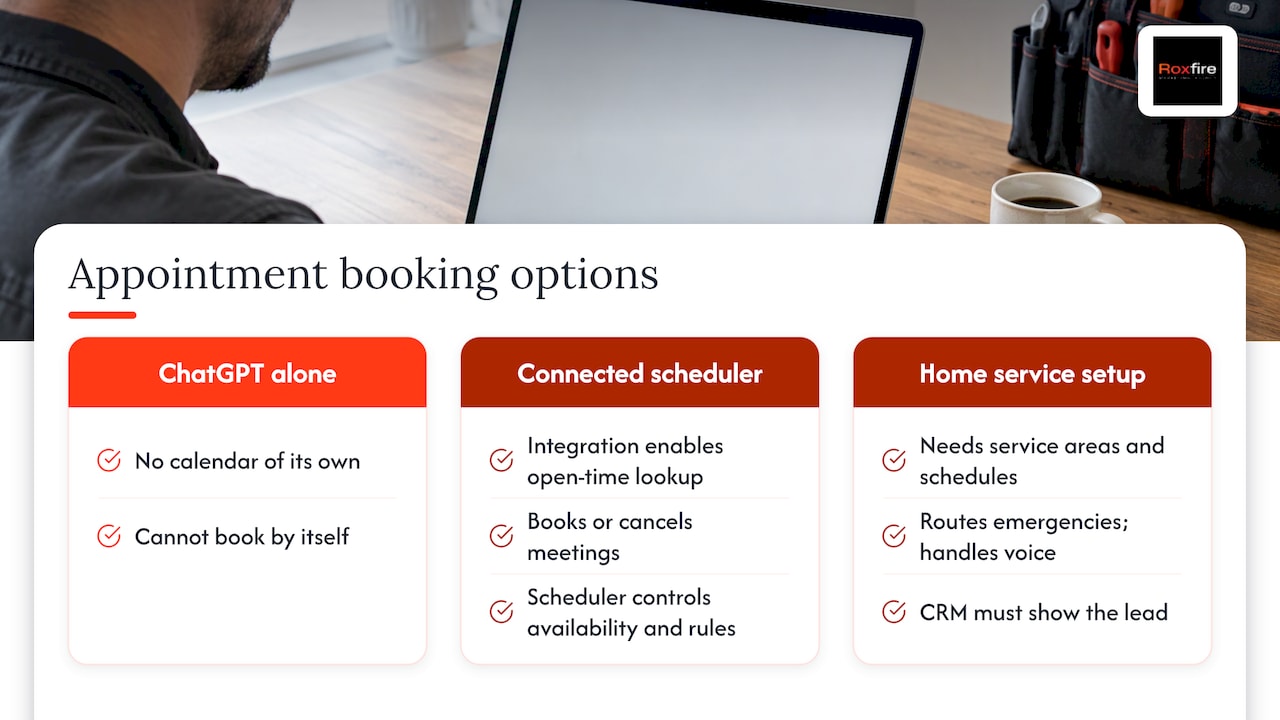
Not by itself. A chat model has no calendar of its own. It can book only when it is connected to a scheduling tool through an integration, and then the scheduling tool still controls availability, booking rules and what gets saved. Calendly's help documentation, for example, describes connecting its scheduler to ChatGPT or Claude so the assistant can find open times and book or cancel meetings.
That works for a consultant booking calls. A home service company has more moving parts: service areas, technician schedules, job types with different lengths, emergency routing, call handling by voice, and a CRM that must show the lead. Stitching those together yourself is a project, and it is where most do-it-yourself setups fail. This is the work our AI voice and automation team takes on, alongside the CRM and tracking it has to connect to. You can see what we offer on our AI voice and automation services page.
How to set up AI appointment booking, step by step
Whether you build it with Roxfire or plan it internally first, the order matters. Setting the foundation before the AI saves the most pain.
Step 1: Pick one source of truth for your calendar
Decide which calendar is the master: Google Calendar, Outlook, or the scheduling module in your field service software. Every channel must read from and write to that one calendar. Where it goes wrong: a separate "AI calendar" that nobody checks, which produces double-bookings.
What we do here: Roxfire sets up CRM and automation, including Go High Level CRM, so booking, lead records and follow-up live in one place.
Step 2: Write your booking rules
List appointment types and how long each takes, the hours and days you book, buffers between jobs, the ZIP codes you serve, and what counts as an emergency. A furnace estimate and a full system install should not occupy the same slot length. Where it goes wrong: vague rules lead to the assistant booking jobs you would have declined.
Step 3: Prepare what the assistant knows
Gather your services, service areas, pricing ranges you are comfortable sharing, and honest answers to the ten questions customers ask most. Keep it short and accurate. If you do not publish a price, do not let the assistant improvise one.
Step 4: Disclose that it is an AI
A short line in the greeting, such as "You've reached Summit Heating and Cooling's virtual assistant," sets expectations and keeps you ahead of disclosure rules that may tighten. More on that in the rules section below.
Step 5: Connect the CRM and map the fields
Decide what gets saved: name, phone, address, service type, urgency, source of the lead and call summary. Confirm whether each new inquiry becomes a lead record or just a note on an existing contact. Where it goes wrong: appointments that exist on the calendar but not in the CRM, so nobody follows up when a customer no-shows.
Step 6: Set the handoff rules
Decide when a person takes over: a caller asks for a manager, mentions a gas smell or active flooding, is angry, or asks something the assistant does not know. Route emergencies to your on-call phone with the details already captured. A good rule of thumb: the assistant handles the repetitive questions, and your staff takes over where judgment is needed.
Step 7: Test it like a customer
Before going live, call it from several phones. Try to book two jobs for the same slot, ask off-script questions, interrupt it, give an out-of-area ZIP code, and trigger every escalation rule. Read the transcripts. Fix what breaks. Then read every transcript in the first week live, and sample after that.
Step 8: Add reminders and follow-up
Booking is half the job; showing up is the other half. A Cochrane review summarized by the American Academy of Family Physicians found that text message reminders increased attendance at health care appointments compared with no reminder. That evidence is from clinics, so treat it as a sign of direction for dental and spa practices, and test reminders in your own trade. Our email nurture and follow-up systems keep estimates warm for the customers who are not ready to book on the first contact.
What to measure
Vendor case studies throw around big numbers. Ignore them as benchmarks and build your own scoreboard. Your assistant is working if these move in the right direction over 30 to 90 days:
- Answer rate: the share of inbound calls and messages that get a response.
- Booking rate: appointments booked divided by qualified inquiries.
- Handoff rate: how often a person has to step in, and whether the handoff notes are usable.
- Show rate: booked appointments that turn into on-site visits.
- Close rate and revenue per booked job: the number that decides whether the system pays.
- Cost per booked job: ad spend plus management cost, divided by jobs actually booked.
The last two matter most. A booking tool that raises appointments but not sold jobs is only moving the problem. This is why we track campaigns to revenue rather than to clicks or form fills. Conversion tracking should show which ad, search or call led to which booked job. We do not make it a default step to install third-party tracking pixels, and we set up tracking around what your business needs to measure.
A worked example
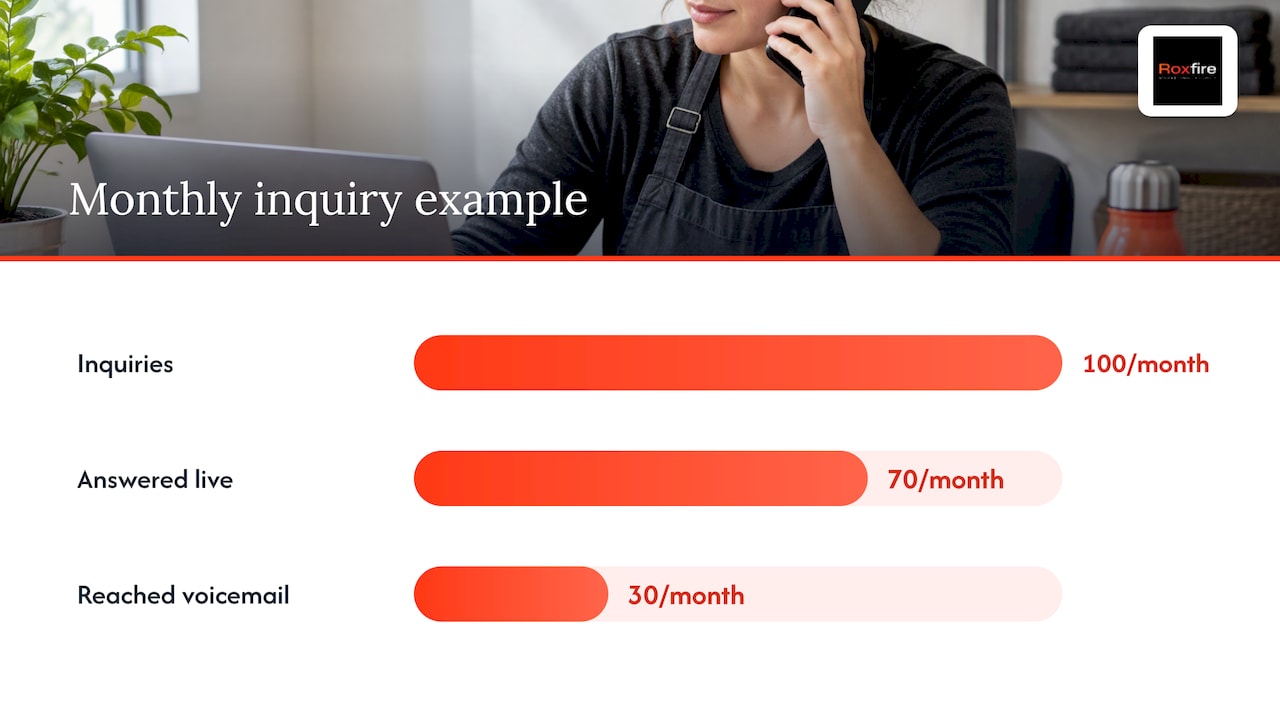
Say a cleaning company gets 100 inquiries a month and answers 70 of them live. The other 30 reach voicemail. Suppose an assistant answers all 30 and books some share of them. If even a handful become recurring customers, the gain compounds, because recurring clients pay month after month. That is an illustration, not a forecast. Your own call log tells you how many calls go unanswered, and your own close rate tells you what an answered call is worth.
Rules you need to know in the U.S.
AI booking touches telephone and privacy law. This is general information, not legal advice, and you should confirm your setup with an attorney, especially before using AI for outbound calls or texts.
- AI voices count as artificial voices. In February 2024, the FCC ruled that AI-generated voices are "artificial" under the Telephone Consumer Protection Act (TCPA), the federal law that restricts automated calls and texts. In practice, calls you place with an AI voice, such as a reminder, generally need the customer's prior consent.
- Get consent at booking. Record that the customer agreed to receive reminder calls or texts, and honor opt-outs such as STOP right away.
- Keep reminders and sales separate. A reminder call that turns into an upsell can be treated as marketing, which carries stricter consent requirements.
- Inbound calls still need care. Disclose the AI in the greeting, and check your state's call-recording rules, since some states require everyone on a call to consent to recording.
- Texting needs registration. Business texting in the U.S. runs through carrier registration, and unregistered messages may not deliver reliably.
The consent rules have been changing through court decisions and FCC orders, so confirm the current requirements before you launch and again each year.
What to expect on timelines and cost
Be honest with yourself about the pieces:
- Setup takes real preparation. The technology can go live quickly, but your rules, scripts and calendar cleanup take longer. Expect an iteration period after launch.
- AI booking does not create demand. It converts the demand you already have. If few people are calling, you need more of them from Google Ads, Meta Ads or SEO.
- Paid ads need a real budget. Roxfire's Google Ads management starts at $1,200/month and Meta Ads management starts at $940/month. Ad spend is paid directly to the ad platforms and is separate from the management fee.
- SEO takes months. Local SEO and on-page SEO build over time, which is why a booking system on top of your existing calls is often the fastest fix.
- Nobody can guarantee leads. We do not, and you should be wary of anyone who does.
Where Roxfire fits
Most owners we talk to do not need another standalone tool. They need the whole path working: ads or search bring in the call, an AI assistant answers and books it, the CRM records it, and follow-up and reporting tie it to revenue. Roxfire is a performance marketing agency built for local service businesses, and we handle that path across Google Ads, Meta Ads, SEO, AI voice assistants, CRM setup and automation. There are no long-term contracts.
If you want to see where your current setup leaks, the next step is a free marketing audit. We look at how leads reach you, how many get answered and where tracking breaks down. You can book your free marketing audit with Roxfire and we will show you the gaps before you spend another dollar.

For a deeper look at how we think about phone coverage, read our post on AI phone answering for local service businesses.
FAQ
Can AI schedule appointments?
Yes. An AI assistant can check your live calendar, offer open times, book the slot and send a confirmation, by phone, text or web chat. It works best when it is connected to one master calendar and your CRM, with clear rules for which jobs to book and when to hand off to a person.
What is the difference between an AI booking assistant and an online scheduling link?
A scheduling link lets a customer pick a time on a page. An AI booking assistant holds a conversation, asks qualifying questions, handles calls and texts, and records the details in your CRM. For trades where customers call first, the conversational part is what captures the lead.
Will an AI booking assistant replace my office staff?
It is better to think of it as covering the repetitive first contact: answering, qualifying and booking. Your staff still handle judgment calls, upset customers, complex quotes and emergencies. Setting clear handoff rules is what keeps the two working together.
Do I need customer consent for AI reminder calls and texts?
Generally yes. Federal rules treat AI-generated voices as artificial voices, so reminder calls and texts need prior consent, and customers must be able to opt out. Record consent when the appointment is booked and review your setup with an attorney.
Want this handled for you?
We run Google Ads, Meta Ads, and SEO for local service businesses. Book a call and we will show you what your numbers could look like.