
# AI Phone Answering Service for Local Service Businesses

An AI phone answering service picks up every call to your business, talks with the caller, collects the job details, books or routes the request, and sends you a summary. For a service business, the point is simple: a caller with a broken furnace, a leaking roof or a stuck garage door often calls the next company on the list when nobody answers. Roxfire Marketing Agency builds AI voice and phone automation for local service businesses so that the calls your marketing generates get answered and turned into booked work.
This guide explains what the technology does, how to set it up without hurting your reputation, what to hand to a human, and which rules apply in the U.S.
- An AI phone answering service is software that answers inbound calls, holds a two-way conversation, captures lead details, books appointments and routes urgent calls. Voicemail only records a message.
- The setup decisions matter more than the software: what the AI may say, which calls always go to a person, and who covers when that person is off.
- Start with after-hours or overflow calls, read every transcript at first, and widen coverage only when the results hold up.
- Recording and consent rules vary by state, and the FCC treats AI-generated voices in outbound calls as artificial voices that need consent. Put a short recording notice in the greeting and check your setup with an attorney.
- Answering calls is half of lead generation. The other half is getting the right calls in the first place.
What an AI Phone Answering Service Actually Does
Zoom describes an AI answering service as software that handles inbound business calls on its own: it greets callers, answers common questions, books appointments and routes calls to the right person at any hour. That is the difference from voicemail, which records a message and waits for someone to call back.
In practice, each call moves through the same stages:
1. The call arrives. Callers dial your normal number. You forward it to the service, or the service answers when you do not. 2. Speech recognition. The caller's voice is turned into text in real time. 3. Understanding. A language model (the same kind of AI behind chat assistants) works out what the caller wants, using only the instructions and business information you gave it. 4. Action. The system checks calendar availability, books a slot, creates a contact in your CRM (customer relationship management software, where you track leads and jobs), or transfers the call. 5. Reply. Text-to-speech answers in a natural voice. 6. After the call. A transcript and summary are stored, the contact record is updated, and a confirmation text or follow-up can go out.
Two technical details decide whether it sounds natural or robotic. One is latency, the pause between the caller finishing and the AI answering. The other is background noise, because many of your customers call from a car, a driveway or a job site. When you evaluate any system, call it from a noisy place and see how it copes.
Why Missed Calls Hurt Trades More Than Most Businesses
Most local service work is booked by phone, and a lot of it is urgent. Think about who calls and when:
- A homeowner whose AC quit on a hot evening.
- A property manager with water coming through a ceiling after a storm.
- Someone with a garage door spring that snapped with the car inside.
- A dental patient with a cracked tooth who wants the earliest slot.
These callers are comparing several companies at once. The first one to answer gets the conversation, and a voicemail box is rarely a winning first impression. Your crews are on roofs, in attics and under sinks, and your office staff are on other calls. That is when calls slip through, and it is also when the ad money you spent to make the phone ring is wasted.
If you run paid ads, every missed call is a lead you already paid for. Our article on after-hours call answering for local service businesses goes deeper on evenings and weekends.
What It Can Handle, Trade by Trade
A well-configured AI receptionist can do the same core jobs in any trade: answer questions, ask qualifying questions, book appointments, screen spam calls and pass urgent callers to a person with the details already collected. What changes is the script.
| Trade | Questions the AI asks | What it should hand to a person |
|---|---|---|
| HVAC | What system is it, what is it doing, when do you need service? | No heat in freezing weather, gas smell, any safety concern |
| Roofing | Leak or full replacement, what part of the house, any storm damage? | Active leak after a storm, insurance claim questions |
| Cleaning | Home or office, size, how often, preferred start date? | Complaints, custom quotes outside your standard pricing |
| Moving | Move date, from and to addresses, size of home, stairs or elevator? | Same-week moves, large commercial jobs |
| Restoration | Water, fire or mold, is the water still running, is anyone at risk? | Every emergency loss, always to your on-call person |
| Garage door | What is the door doing, is it stuck open or closed, spring or opener? | Anyone unable to get a vehicle out or secure the home |
| Pool and spa | New build, renovation or service, budget range, timeline? | Large project inquiries from qualified buyers |
| Dental | New or existing patient, reason for visit, insurance, preferred times? | Severe pain, swelling, trauma, anyone asking for a clinician |
The qualifying questions in the table follow a pattern that home-service setups commonly use: ask what the issue is, what type of system it is and when service is needed, then pass that to your team before they pick up the phone. Write your own list from the questions your best dispatcher already asks.
How to Set It Up Without Damaging Your Reputation
Treat this as a process change, not a software install. Listen to how calls are handled today, write down the handoffs, then choose and configure the tool.
Step 1: Decide the coverage scope
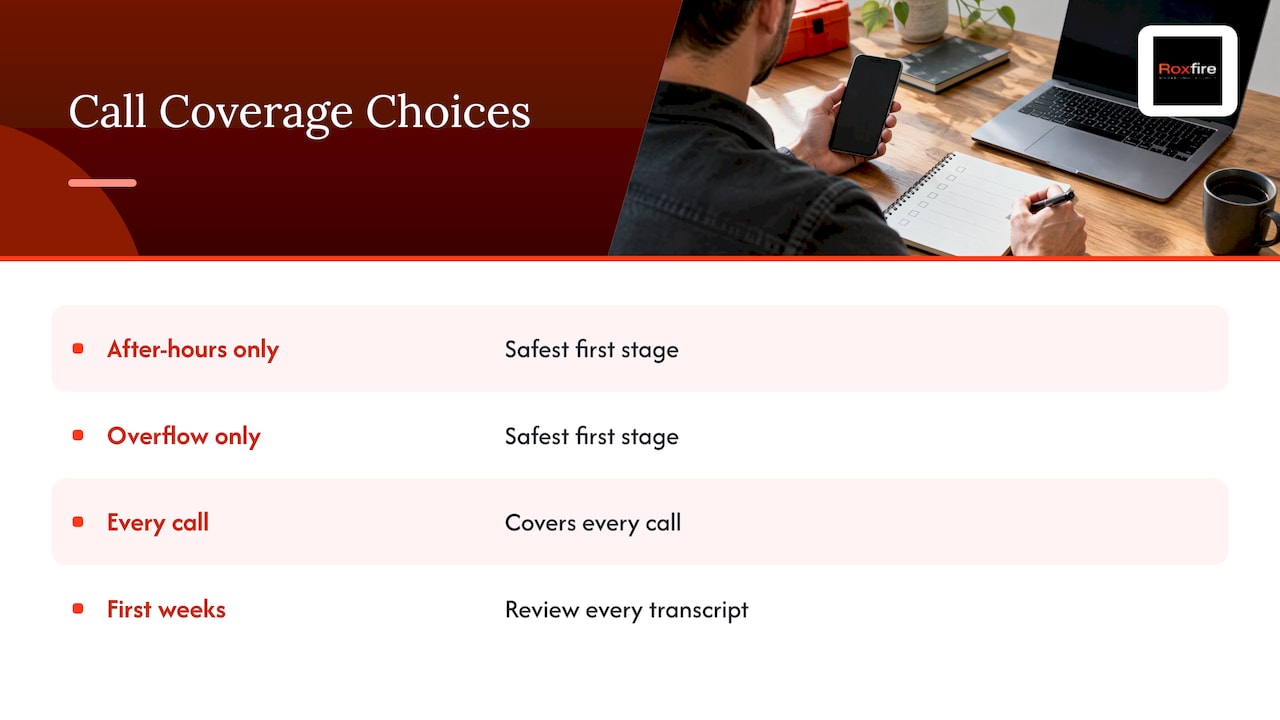
Choose one: after-hours only, overflow only (when your lines are busy or unanswered), or every call. After-hours or overflow is the safest first stage, because it replaces voicemail rather than your people. Take the extra step of reviewing every transcript during the first weeks.
Step 2: Write the always-human list
This is the most important design decision. List the situations that always go to a person:
- Safety issues such as a gas smell, exposed wiring, smoke or flooding.
- Angry or distressed callers.
- Billing disputes and cancellations.
- Anyone who asks for a human.
For each one, name who gets the call, how they are reached, and who covers when they are off. An AI receptionist should not give legal, medical or financial advice or handle 911 emergency dispatch. For a dental office, that means no clinical advice. For a gas smell, the script should tell callers to follow safety instructions you have approved, such as leaving the building and calling 911 or the gas utility, and then page your on-call person.
Step 3: Connect your number
Most systems work by call forwarding. Unconditional forwarding sends every call to the AI. Conditional forwarding sends only unanswered or busy calls, which suits overflow. Set hours-based routing so that daytime calls ring your office first.
Step 4: Connect your calendar and CRM
The AI is only as useful as what it can write to. It should book into the right calendar with real availability, create or update the contact, and log a call summary. If your leads live in a spreadsheet, the AI just creates a second pile of unread information. Roxfire sets up Go High Level CRM and automation, so the call summary, the booking and the follow-up sit in one system.
Step 5: Write the script and limit what it can say
The script is your company's voice. It should sound like a person, answer questions instead of putting callers on hold, and have a clear fallback message when nobody is available. Just as important, limit what the AI may say. An invented price, warranty or promise is a serious failure. If you do not give quotes by phone, the AI should say a technician will confirm pricing on site.
Step 6: Test with realistic calls
Do not launch after one good demo. Run at least a dozen test calls covering:
- A normal booking and a reschedule.
- A pricing question.
- An angry caller.
- A request for a human.
- A noisy line and a heavy accent.
- An interruption mid-sentence.
- An emergency phrase.
- A question outside your services.
Check that the callback number is read back digit by digit, the address includes the ZIP code, and the problem is recorded in the caller's own words.
Step 7: Launch in stages
Run a pilot of about two weeks on after-hours or overflow calls. Compare the bookings it captured with your normal baseline. Widen the AI's role only when your office staff agree it is helping.
If you would rather not build this yourself, Roxfire handles AI voice and automation as part of its service for local service businesses. Your time stays on jobs, not on call-flow diagrams.
Answering the Call Is Only the First Step
A booked appointment is not a closed job. Speed of response matters across channels: a web form, a missed call and a Google Ads click all need a fast reply. Tools built for home-service businesses can send an automated call response and missed-call text alerts so a new lead hears from you quickly, and follow-up emails can keep contacting people who did not book on the first try.
That follow-up is where many leads are won or lost. Roxfire's email nurture and follow-up systems are built for it. For the phone side, a platform that turns calls into appointments, for example one that can convert inbound calls into appointments through lead capture and human hand-off, shows how the pieces fit together.
One honest tradeoff: AI answering does not create demand. If few people call, it will answer few calls. It makes sure the calls you already earn are not lost.
Rules to Follow: Consent, Recording and Disclosure
This is a legal area, and the details depend on your state. Use this as a map, then confirm your setup with an attorney who knows your state's rules.
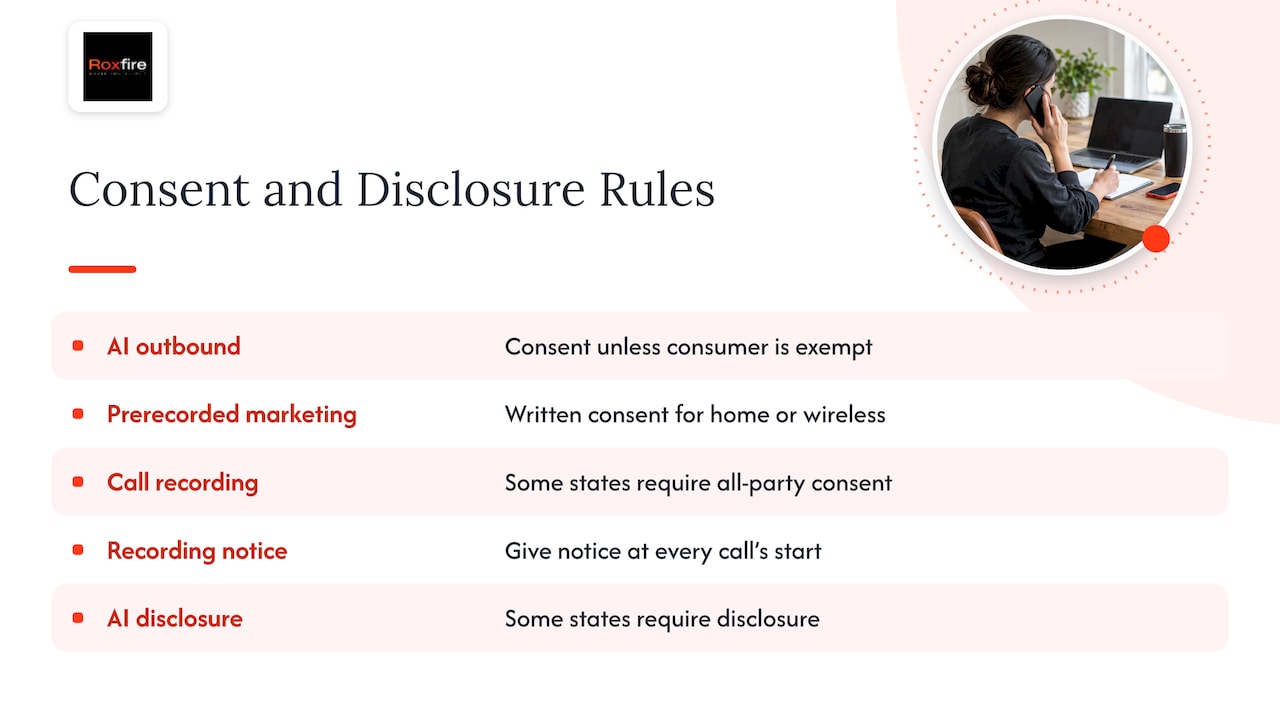
Automated calls. The FCC states that AI-generated voice calls are illegal unless the consumer has agreed to receive them or the caller is exempt, and prior written consent is required before prerecorded telemarketing calls to home or wireless numbers. This is mainly a rule about outbound calls. If you plan to have an AI call leads back or phone past customers to promote services, get the consent first and keep a record of it. Answering inbound calls from people who dialed you is a different situation, but it still raises recording questions.
Call recording. AI receptionists typically record and transcribe calls. Federal law allows one-party consent, but some states require every person on the call to consent. Because calls often cross state lines, the careful approach is to follow the stricter rule. The cheap, safe default is a short recording notice at the start of every call, built into the greeting.
Disclosure. Some states have their own rules on telling people they are talking to AI. A simple opening such as "Thanks for calling, this is the virtual assistant for your company, and this call may be recorded" covers both points in one sentence. Ask your attorney to review the wording, especially for dental and other practices that handle health information.
What It Costs and How to Think About It
AI answering services are usually priced as a monthly plan that includes a set number of minutes or calls, sometimes with a per-minute rate beyond that. The range across the market is wide, and what you pay depends on call volume, integrations and how much setup is included. When you compare options, ask about:
- What happens when you hit the minute limit.
- Whether CRM and calendar integrations are included.
- Who builds and maintains the call flow.
- What reporting you get on missed, booked and transferred calls.
The better comparison is not software against software. It is the monthly cost against the value of the jobs you currently lose. Take your average job value, estimate how many calls go unanswered in a typical week, and see what recovering even a few of them is worth. For a roofing or restoration company with high-ticket jobs, one recovered job can matter a great deal. For cleaning, the value is in recurring customers.
Roxfire does not publish a price for AI voice and automation, so the cost depends on your setup. A free marketing audit is the way to get a clear scope.
Where Roxfire Fits
Roxfire is a performance marketing agency for local service businesses. We combine Google Ads, SEO, Meta Ads, AI voice assistants and automation, so the work of getting calls and the work of answering them connect. Campaigns are tracked to revenue rather than vanity metrics, and there are no long-term contracts.

If you want the calls your marketing generates to be answered, qualified and followed up, see our AI voice and automation services or book a free marketing audit and we will look at where your leads are going today. For reference, our Google Ads management starts at $1,200 per month and Meta Ads management at $940 per month. Ad spend is paid directly to the ad platforms and is separate from our fee. We never guarantee a number of leads: results depend on your market, your budget and how fast your team follows up. SEO takes months to build, and paid ads need a real budget to give you usable data.
FAQ
Can AI answer my business phone calls?
Yes. An AI phone answering service answers inbound calls in a natural voice, answers common questions, captures caller details, books appointments and transfers urgent calls to a person. You set the rules for what it may say and when it must hand off.
Is an AI answering service better than voicemail?
Voicemail records a message and waits for you to call back. An AI answering service holds a conversation, collects job details and can book the appointment during the call. For urgent trades such as HVAC, restoration and garage door repair, that difference often decides who gets the job.
Should the AI handle emergency calls?
It should recognize them and pass them to a person, not resolve them. Write a list of emergency situations for your trade, name who gets the call and who covers if that person is off. For anything life-threatening, the script should direct the caller to 911.
Do I need to tell callers the call is recorded?
Yes, play a short recording notice at the start of each call. Some states require every party's consent to record, and the simplest safe approach is to include the notice in your greeting. Have an attorney check the wording for your state.
Want this handled for you?
We run Google Ads, Meta Ads, and SEO for local service businesses. Book a call and we will show you what your numbers could look like.